Register an account:
- Click here to start registering an account
- In the registration form, enter the following information: Full name, Email address, Username, Password. Then, click Register to complete.
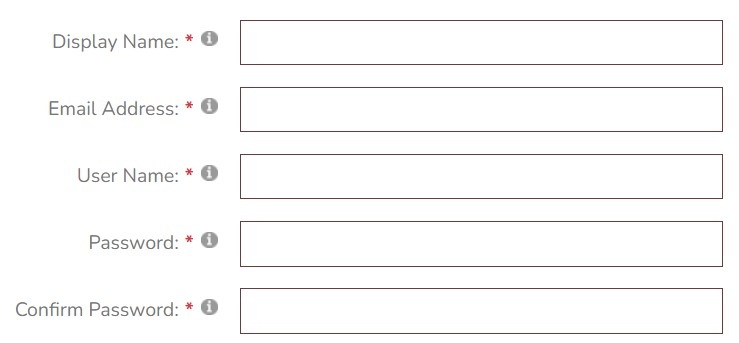
Account Confirmation:
After successful registration, a confirmation email will be sent to you via the registered email by the website system. You access your mailbox and click on the link in the email content to lead to the account activation page.
Abstract Instructions:
- TITLE OF PAPER: The abstract title should be formatted in Capitalize the initial letter of each word, with the exception of scientific names which should be upper/lower case and italicized (see example). Scientific names should not be preceded or followed by commas or parentheses or other markings.
- AUTHOR(S): The first author is typically the presenting Use * after the presenting author. Type in upper/lower case.
- ADDRESS AND EMAIL: Type only the presenting author's institution, address, and email. Type in regular upper/lower case.
- KEYWORDS: Please provide 3-5
- MAXIMUM LENGTH: 200 – 250 words
- PAGE SIZE: Standard A4 paper (210mm x 297mm = 27” x 11.69”) (portrait)
- SPACING: Single spaced
- PARAGRAPHS: Paragraphs should be separated by a blank line and should not be indented.
- FONTS: Character fonts should be 12-point
- PHOTOS, FIGURES & TABLES: Photos, figures, and tables are highly recommended and they may be in color. They should be reduced to the appropriate size for a one-page abstract and should be clearly readable at the reduced The reduced figures and tables should be included in the abstract.
- All accepted abstracts will be included in the conference handbook
- The presentation applications for the submitted abstracts will be evaluated by the organizing committee.
Conference posting steps:
Step 1: Log in with the account you registered on the website
Step 2: Access the submission page by clicking here or clicking the Submit Online button on the home page
Steps 2: On the article management page, click on the Add new link to submit an article.
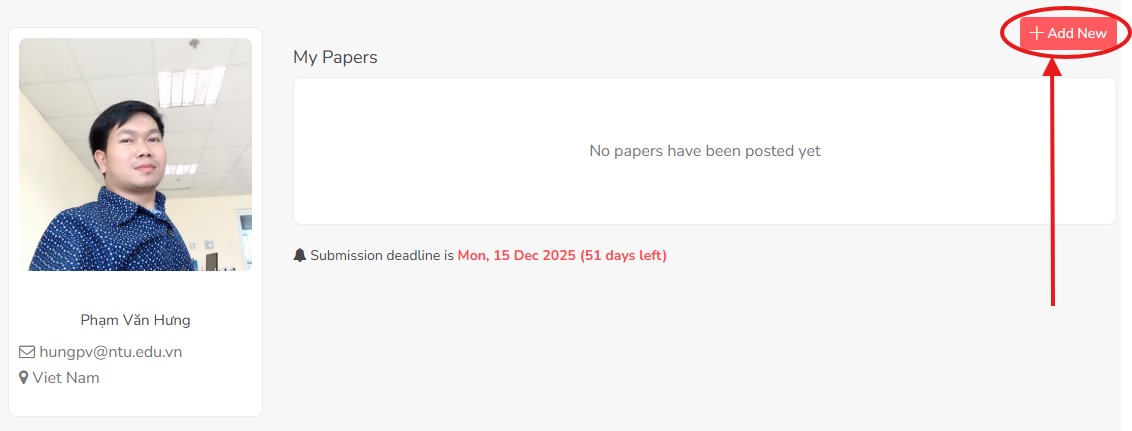
Step 4: Fill in the required information and upload the Abstracts file. Then click the Finish button to submit your paper.
Note: You can update your information and files at any time before the deadline.